Need help standing out in local search results? An incomplete or unoptimized Google Business Profile may be holding you back. Without accurate, up-to-date information, your visibility on Google Search and Maps diminishes. This makes it harder for potential customers to find you. In today’s competitive market, this can lead to lost leads and missed opportunities.
The good news is that an optimized Google Business Profile can turn things around. With the right approach, you can boost your ranking and attract more traffic. This will help you convert searchers into loyal customers.
Learn how optimizing your business listing boosts local SEO and grows your brand.
What is A Google Business Profile?

Google Business Profile (formerly Google My Business) is a free tool from Google. It helps businesses manage their presence on Google Maps and Searches. Companies can showcase key details like their profile, business location, and contact information.
Optimizing this profile improves local search visibility. It gives business owners more opportunities to connect and maintain contact with customers. It is an essential tool to enhance your online presence. Post updates and use high-quality photos to build trust. This approach helps attract and engage potential clients through customer and business reviews.
Why is A Google Business Profile Important?
In today’s digital world, having a strong online presence is essential for businesses. A Google Business Profile has a vital role in shaping a company’s image to customers. It can influence their decision-making process. Hence, understanding its value is crucial to leveraging its full potential. Businesses seeking visibility and growth in a competitive industry need this marketing tool.
Let’s explore the key reasons why a Google Business Profile is essential.
Improves Local Visibility
A Google Business Profile is crucial for boosting your local visibility. It helps businesses appear more prominently in Google Search and Maps when users look for services in a specific area. Accurate business addresses and other details boost your chances of ranking high in organic searches. This improved visibility drives targeted traffic to both your website and physical location. Check out also our article on how to drive organic growth to your business like a pro.
An outdated profile can hurt your business search rankings and confuse customers. For example, incorrect hours or contact information can lead to missed opportunities.
To improve local SEO, ensure your profile matches the keywords your customers use. Encourage them to leave positive online reviews to further boost your rankings.
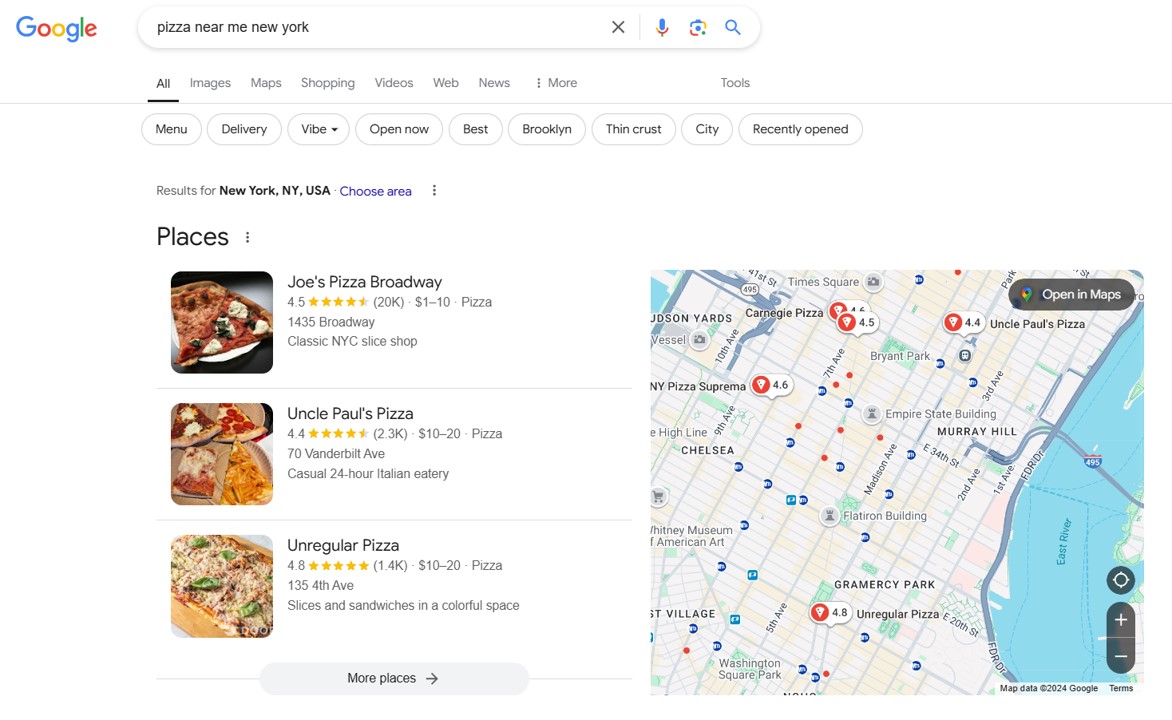
Drives Customer Engagement
An optimized Google Business Profile boosts customer engagement. It provides several ways for customers to interact with your business. Features like reviews, direct messaging, and calls make it easy for potential customers to connect with you.
Engaging with reviews, whether positive or negative, shows that you value feedback. This responsiveness builds trust and strengthens your reputation. Ignoring reviews or failing to engage can hurt your credibility.
Regularly respond to reviews and update your profile with promotions through Google Posts. This will keep customers engaged. Staying active and responsive helps build stronger customer relationships.
Increases Brand Awareness
A Google Business Profile is essential in building brand awareness for local businesses. Update your profile with quality photos and accurate details to make your business more recognizable. Timely updates also ensure your business stays top of mind for potential customers.
This not only boosts visibility but also builds trust. Customers can see what sets your business apart from competitors. Neglecting your profile may lead to missed opportunities to showcase your brand. As a result, customers may choose competitors with more active profiles.
To boost brand awareness, highlight what makes your business unique. Share updates, promotions, and services to keep your profile engaging and relevant.
Maximizes Mobile Search Opportunities
With the rise of mobile searches, optimizing your Google Business Profile is crucial for mobile marketing. Mobile users often look for quick information like hours, directions, or contact details. A well-optimized profile ensures your business appears prominent in mobile searches and on Google Maps.
This increased visibility can drive more traffic to your physical location. If your profile isn’t mobile-friendly, slow load times or poor visibility may frustrate users, leading to lost business.
Ensure your contact details are easily clickable. Make sure photos and videos load quickly on mobile devices. This improves the user experience. It also increases your chances of turning mobile searchers into customers. Check out our guide to mobile optimization to learn more tips.
How to Create Your Google Business Profile?

Creating a Google Business Profile is key for boosting visibility and connecting with customers. It’s more than just filling in basic information. Every detail should improve your profile’s effectiveness. From setup to regular updates, each critical step makes it easier for customers to find and engage with your business.
Let’s break down the process into simple, actionable steps.
Setting Up Your Google Business Profile
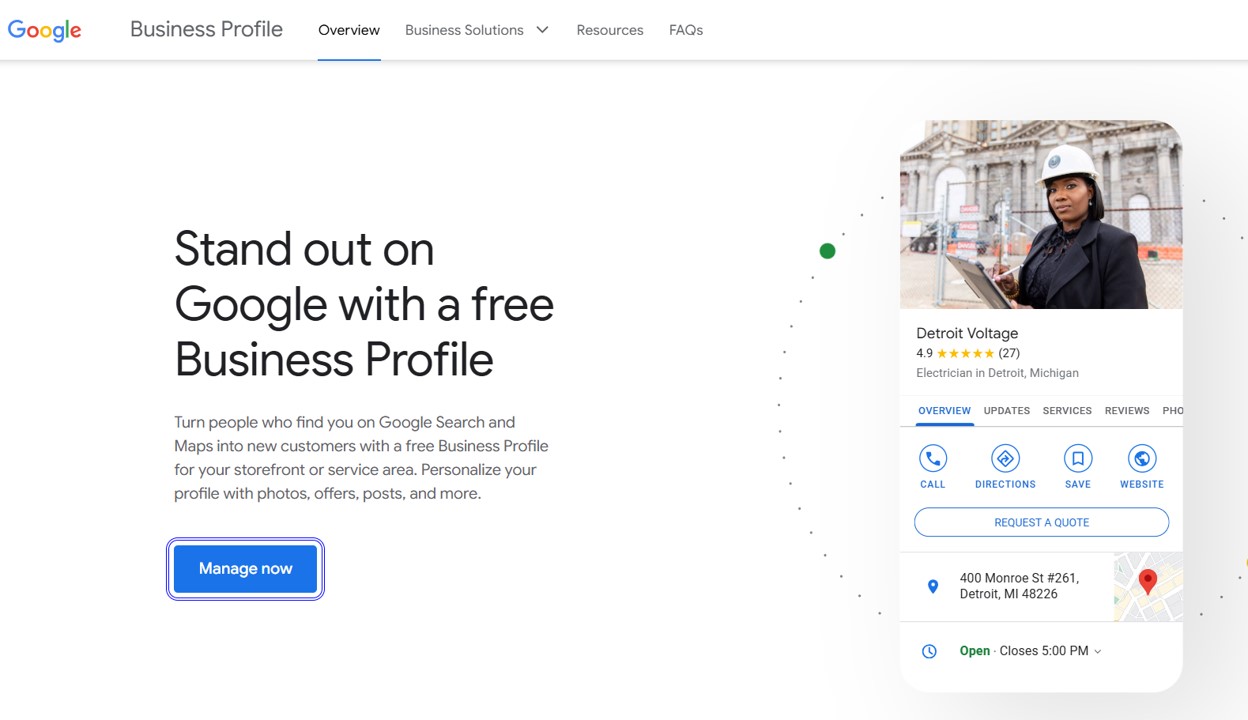
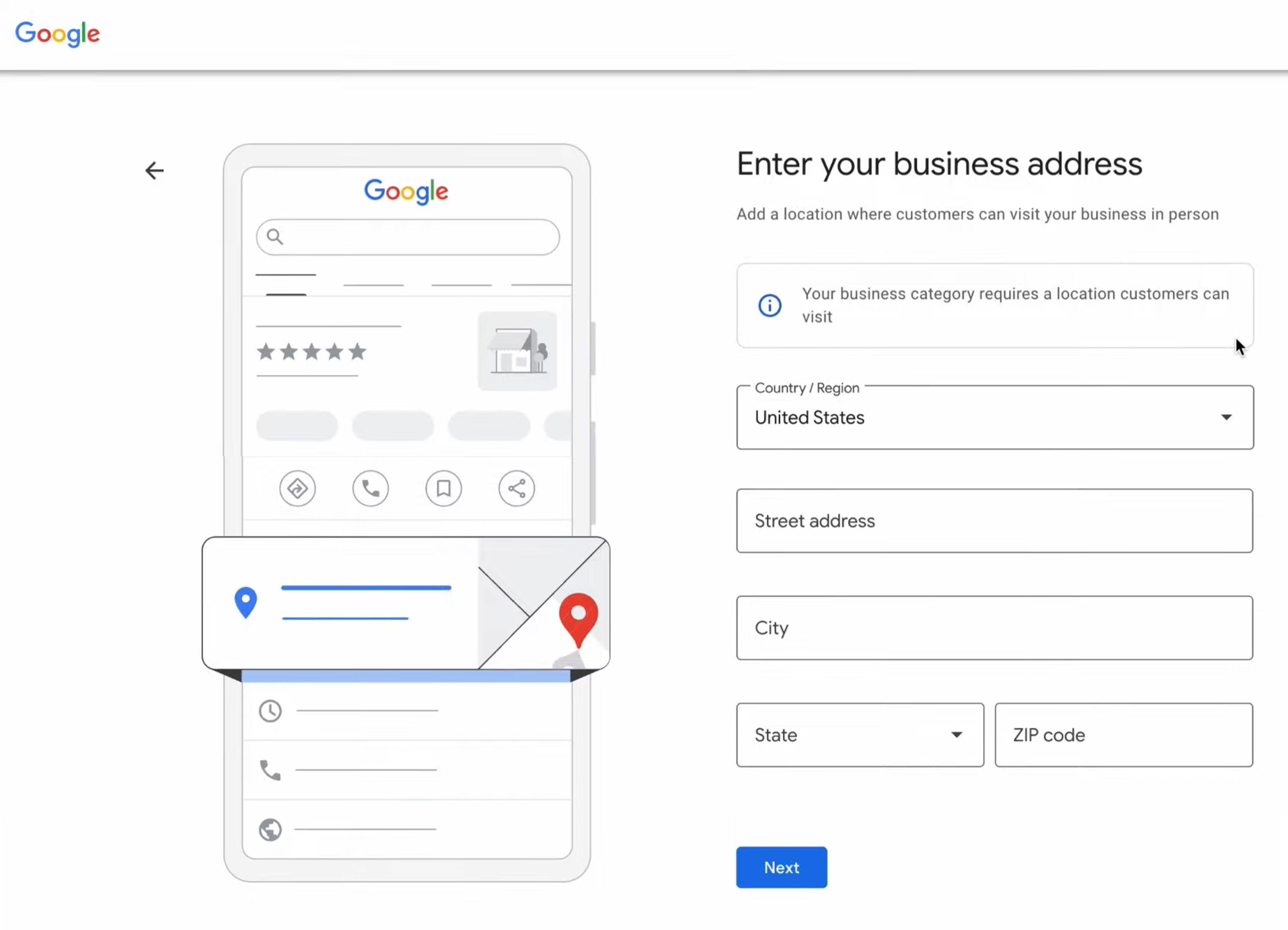
Start by going to Google Business. Log in to your Google account to create a Google Business Profile. From there, enter your business name. Next, add key details like your location, business hours, and contact information. This step seems simple, but precision is key. Inconsistent information across platforms can harm your local SEO efforts and confuse customers.
Add your address using the exact physical location. This helps Google map your business accurately. The more precise your details, the more likely you are to show up in searches relevant to your area. Google lets you set a service area for businesses with many locations or no storefront. This helps you reach customers outside your immediate location.
Completing the setup gives your profile a solid foundation, but the real impact comes from refining the details.
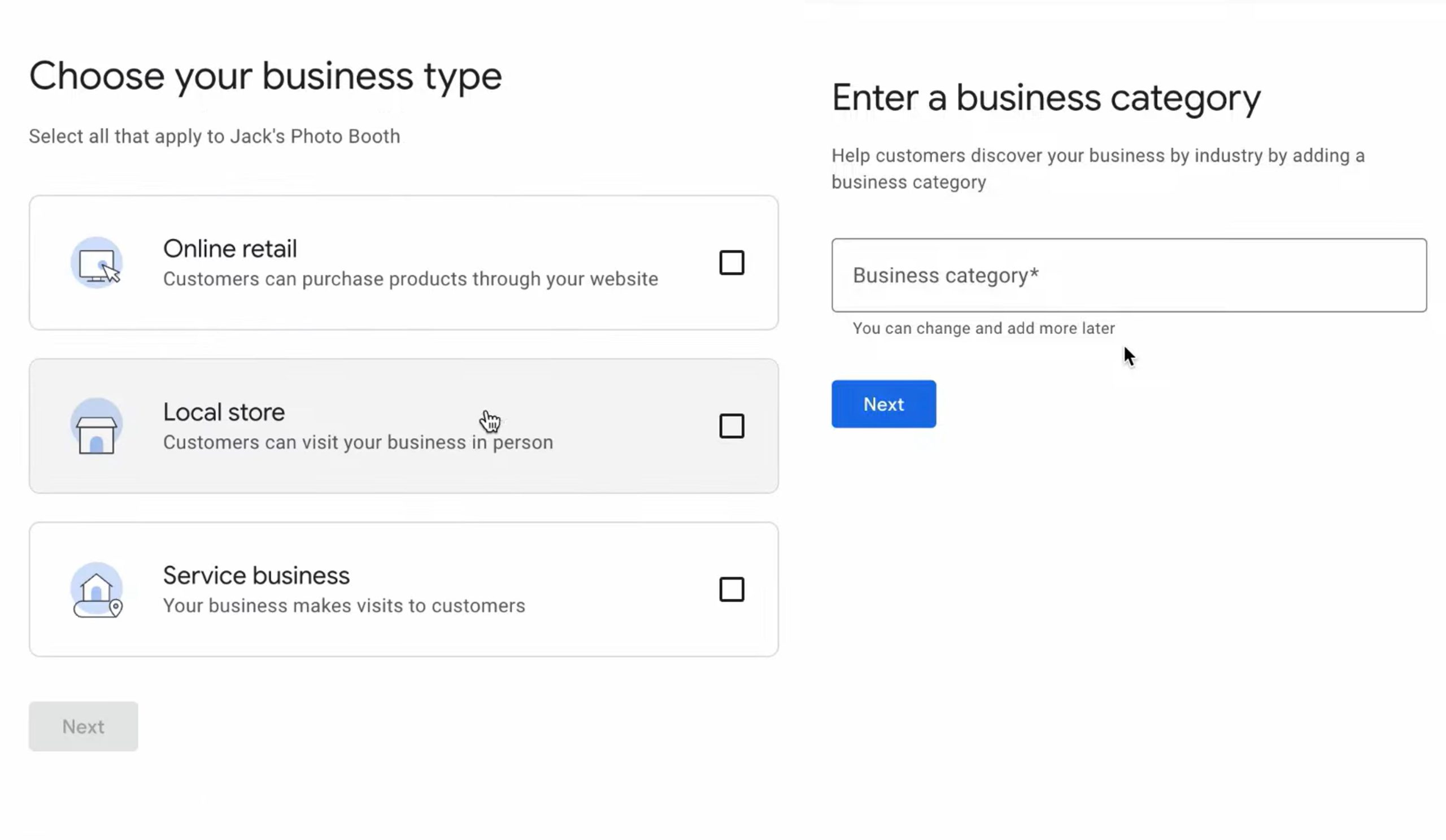
Choose The Right Business Type and Business Category
Select the right business categories to improve your chances of appearing in relevant searches. Google lets you choose a primary category and a secondary one to describe your business. However, this requires careful selection. If your category is too broad, like “Store,” you might miss out on specific searches such as “Jewelry Store” or “Grocery Store.” Yet, if you’re too specific, you may be limiting your visibility in general search results.
Understanding what your competitors use as their categories can provide insight. Remember, Google uses these categories to match your business with relevant search terms. Choose the options that best reflect your core offerings. Fine-tuning them directly affects how customers find you. If you choose poorly, potential traffic may go to better-optimized competitors.
Verify Your Profile
Once you’ve entered the essential details, you must verify your business. The verification process is more than a formality. It’s required to make your profile visible and functional. Google usually sends a postcard with a verification code to your business address. You’ll need to enter this code to complete the process.
Verification confirms your business is legitimate and prevents unauthorized claims. While mail is common, Google may offer email or phone options for some businesses. This depends on their type and location. Without completing this step, your profile remains incomplete and hidden from most searchers. This step, though simple, can cause delays if overlooked.
Optimize Your Profile with High-Quality Media
Visual content is a powerful element of a well-optimized Google Business Profile. High-quality photos and videos attract more views and engagement from potential customers. Businesses that use professional images of their products or services build trust faster. Photos of their premises also help. For example, a restaurant with clear, inviting photos of its menu items will attract more clicks. In contrast, low-quality or outdated images can turn customers away.
Videos add another layer to this by offering a more dynamic look at your business. Videos engage users more effectively than static images. Whether it’s a store walkthrough, a service demo, or customer testimonials, videos capture attention better. They create a more dynamic experience for viewers. Regular updates are key. Fresh media shows that your business is active and engaged.
However, poor-quality media can hurt your business. Pixelated images or unclear videos can make your business seem less professional. This can push potential customers away before they even consider visiting. Ensure your media is well-lit, properly framed, and reflects your brand. Check out our article to learn more tips on how to optimize your Google Business Profile for maximum visibility.
Add Additional Information Like Services and Products
A Google Business dashboard allows detailed service or product listings. Many businesses overlook this, but it’s a great way to showcase your offerings. It helps potential customers easily understand what you provide.
Listing services with descriptions and pricing helps customers make informed choices. For example, having a Google Business Profile can enhance the reach of contractors, painters, electricians, plumbers, and those who provide HVAC services.
On the other hand, retail businesses can show product categories, prices, and promotions. Regular updates keep your profile fresh, especially with new products or services.
Without detailed listings, you may miss out on turning browsers into customers. People value clear information. Providing specifics helps them make confident decisions quickly. Keeping this section accurate also boosts your SEO and improves visibility in searches.
How Do You Optimize Your Google Business Profile for Local SEO?

Optimizing your Google Business Profile for local SEO is key to boosting visibility. It helps potential customers find your business when searching locally. By regularly updating your profile, you keep your information current and relevant. Using SEO-friendly features further helps improve your rankings on Google Search and Maps.
Below, we’ll discuss the key ways to ensure your profile works to its fullest potential.
Add Accurate Information
Accurate, up-to-date information is the foundation of a successful Google Business Profile. Every business detail, from physical address to operating hours, must be correct. Consistency builds trust with customers and search engines.
Incorrect or outdated information confuses customers and hurts your local SEO. Keep your business name, address, and phone number (NAP) consistent across platforms. Regular updates are key. If business services or hours change, update your profile at once to maintain trust and visibility.
Leverage Keywords in Descriptions
Using relevant keywords in your business description improves local SEO. Keyword optimization lets you describe your business while including terms customers search for. Keep the language clear and avoid keyword stuffing.
For example, a repair shop could use “car repair services” or “emergency vehicle repair.” This aligns your profile and boosts your visibility in search results. Regularly update your description to reflect current services and keywords.
Read also: 7 Smart Ways to Use Google Trends for Better SEO
Use Photos and Videos
Visual content is key to attracting attention to your profile. High-quality photos and videos enhance your profile’s appeal and drive more engagement. Businesses with strong visual content typically get more clicks and interactions.
Photos of your storefront, products, or services give potential customers a clear idea of what to expect. Videos can go further by providing behind-the-scenes looks or showcasing customer testimonials. Keeping your content fresh and professional builds trust. This can also help improve your profile’s ranking in local searches.
Encourage Customer Reviews
Customer reviews play a key role in local SEO. Google prefers profiles with fresh, positive reviews. These reviews signal trust to both the algorithm and potential customers. Encourage satisfied customers to leave feedback. This helps boost your visibility and credibility.
Responding to both positive and negative reviews is important. It shows you value customer feedback. This can attract even more engagement. Regularly checking and responding to reviews keeps your profile active. It also improves your reputation and search rankings. Check out our article to learn tips on how to get more Google reviews.
Enable Messaging for Direct Communication
Enabling messaging on your Google Business Profile lets customers contact you directly. It creates an instant connection. This makes it easy for them to ask questions or inquire about your services. It provides a quick and convenient way for customers to engage with your business.
Be sure someone is available to check and respond to messages quickly. Delayed responses can damage your reputation and may turn potential customers away. Enabling messaging improves communication and can also enhance your SEO. It shows that your business is active, engaged, and accessible to customers.
Monitor Competitor Listings
Keeping an eye on competitor profiles provides valuable insights into what’s working in your industry. By analyzing how competitors use their Google Business Profiles, you can learn a lot. Look at the categories they select, how they use media, and how they manage reviews. These strategies can help you improve your own profile.
For example, if competitors post frequent updates or have many customer reviews, take note. This suggests you should focus on similar efforts to stay competitive. Monitoring their profiles helps you identify areas for improvement. It also shows where you might have a competitive edge. Regularly assessing competitors keeps your profile relevant and competitive in local search results.
Utilize Google Posts for Updates and Promotions
Google Posts lets you share updates, events, or promotions directly on your profile. It’s a great way to keep your audience informed and show Google your profile is active.
Regular posts about seasonal offers, new products, or events encourage customers to return. Ensure your posts are relevant and visually appealing. This keeps your profile active and helps maintain customer interest. Each post appears in search results, giving your business extra visibility.
How Can You Manage Customer Reviews on Your Google Business Profile?
Customer reviews on your Google Business Profile shape your reputation and attract customers. Managing reviews means responding to feedback, tracking trends, and boosting SEO. A proactive approach builds trust and strengthens your online presence.
Below, we’ll cover strategies for managing reviews and maximizing their impact.
Respond to Reviews
Responding to reviews, both positive and negative, shows that you value customer feedback. Acknowledging reviews helps build a connection with your audience. It also boosts your business’s credibility. For positive reviews, a simple thank you can enhance the customer’s experience. This small gesture can even encourage them to return.
For negative reviews, it’s important to respond professionally and constructively. Address the issue directly and offer solutions if possible. Show empathy for the customer’s concerns. This demonstrates your commitment to customer satisfaction. It also shows potential customers how you handle challenges. Engaging with all reviews creates a sense of transparency and responsiveness. This builds trust with your audience.
Encourage Positive Reviews
Positive reviews are important for boosting your business’s reputation. They also improve your local SEO rankings. You can’t offer incentives for reviews. However, you can still encourage happy customers to share their experiences. Simple prompts can help remind them to leave feedback. A call-to-action in follow-up emails or receipts can remind customers to leave feedback.
A timely reminder after a positive interaction boosts your chances of getting reviews. Make the process easy by providing direct links to your review page. The more positive reviews you gather, the better. Customers are more likely to choose you over competitors with fewer or lower reviews. Regularly engaging with customers and encouraging reviews can greatly improve your online presence.
Politely Handle Negative Reviews
Negative reviews are inevitable, but how you handle them is critical. Addressing negative reviews promptly and professionally can help mitigate their impact. The key is to stay calm, acknowledge the customer’s experience, and provide a thoughtful response. Show that you are committed to resolving the issue. Apologizing when necessary and offering a solution can turn a dissatisfied customer into a loyal one.
Remember, potential customers will read these reviews and your responses. A well-handled negative review can work in your favor. It shows that your business takes customer service seriously. Avoid being defensive or dismissive, as this can hurt your reputation further. Instead, see negative reviews as a chance to improve and show you care about customer satisfaction.
Monitor Feedback for Improvement
Customer reviews offer valuable feedback. This helps improve your products, services, and overall operations. Checking reviews on your Google Business Profile helps spot recurring issues or trends. If many customers mention slow service or trouble finding you, these are areas to fix.
Using feedback to make changes shows customers you’re listening. It also helps improve your business. You can highlight these improvements in your responses or future marketing. This reinforces your commitment to a better customer experience. Consistently monitoring feedback ensures you stay in tune with customer needs. It allows you to adapt and grow.
Leverage Reviews to Improve SEO
Customer reviews are key to improving your local SEO. Google considers the number, quality, and recency of reviews when ranking your business. A profile with many positive and recent reviews is more likely to rank higher. This drives more traffic to your business.
Encourage satisfied customers to leave reviews regularly. Responding to reviews helps as well. It signals to Google that your business is active. Including keywords like products or services in your responses can boost your SEO further. By leveraging reviews, you increase your visibility and attract more customers.
Respond Timely to Customer Feedback
Timely responses to reviews are essential. They show your commitment to customer service. Responding promptly shows you care about the customer’s experience. It also helps address concerns before they escalate.
Quick responses to negative reviews can prevent further damage to your reputation. For positive reviews, timely replies reinforce the customer’s choice. This encourages them to return. Google rewards businesses that engage with reviews, improving your rankings. Consistently responding to feedback strengthens your profile and builds lasting customer relationships.
How Can You Track The Performance of Your Google Business Profile?
Tracking your Google Business Profile is crucial for understanding customer interactions. It also helps you identify areas for improvement. Google provides several tools and data to monitor your profile’s performance.
By using these insights, you can improve your strategies, boost engagement, and generate more leads.
Below are key ways to track your profile’s performance.
Use Google Insights
Google Insights is a useful tool for tracking your profile’s performance. It gives detailed information about how users find and interact with your profile. Insights show how many views your profile gets. They also reveal what types of searches lead users to your business. Additionally, you can see how users engage with your content.
Google separates searches into two categories. Direct searches are when users search your business by name. Discovery searches happen when users search for a product or service and find your business. Understanding this balance shows how well your local SEO is working. Regularly reviewing Google Insights helps you track trends. It also helps you find areas for improvement and make data-driven decisions.
Track Customer Actions
Beyond tracking views, it’s important to track user actions after visiting your profile. Google Insights shows actions like visiting your website, requesting directions, or calling. These actions show how well your profile converts views into real engagement.
If many users request directions but fewer visit your website, it suggests something. Customers may be more interested in visiting your location than browsing online. If there’s a spike in website visits, it might mean your online content or promotions are driving traffic. Tracking these actions shows how well your profile turns leads into customers. It also helps you find areas where changes might be needed.
Understand The Source of Search Queries
Google Business Profile insights also show how customers are finding your business. It reveals which keywords or phrases lead users to your profile. Understanding search queries helps you align your content with customer intent.
If users find you through product searches, add detailed descriptions and photos. If they search for local services, update your business description to highlight them. Analyzing search queries helps you assess your SEO efforts. It also helps you adjust your keywords to attract more relevant traffic. To know more about SEO, check out our article What is SEO.
Monitor Call and Click Data
Calls and clicks are two key performance metrics for measuring how users engage with your profile. Google Insights shows how many customers called your business directly from your profile. It also tracks how often they click on links like your website or email. Monitoring this data helps you understand customer behavior. It shows how well your profile drives engagement.
For example, a high number of calls might indicate strong local interest in your services. Fewer website clicks could mean your online presence needs improvement. Tracking call data helps you identify peak times for customer inquiries. This allows you to adjust your business hours or staffing.
Tracking clicks, on the other hand, gives you insights into how well your profile encourages digital engagement. This could include visits to your website or clicks on product listings.
Adjust Strategies Based on Data
The data from Google Insights, customer actions, and search queries provide valuable insights. These insights help you adjust your business strategy. If you notice a drop in website traffic or an increase in searches for certain services, it’s time to rethink your approach.
For example, if fewer people request directions, review your location details. You may also need to improve your contact information. If a product or service is getting many inquiries, focus your marketing efforts there. Adjusting strategies based on real-time data keeps your Google Business Profile competitive.
Utilize Conversion Tracking for Leads
Conversion tracking helps you see how your profile impacts your business. It tracks actions like filling out a form, clicking to call, or making a purchase.
Set up conversion goals in Google Analytics or Google Ads. This helps you track how many leads your profile generates. If a promotion or service is driving the most conversions, focus more resources there. Conversion tracking shows how your profile supports business growth.
How Often Should You Update Your Google Business Profile?
Updating your Google Business Profile regularly is key to maintaining your online presence. It ensures potential customers have accurate information. Profiles that are updated consistently perform better in search rankings. They attract more engagement and show professionalism.
Below are several key areas to focus on when deciding how often to update your profile.
Monthly
Updating your Google Business Profile monthly keeps details like hours and services current. Regular updates help keep your profile fresh and show that your business is active. This prevents outdated information from confusing or frustrating potential customers.
Immediately After Major Changes
Any major change, like a new location or phone number, should be updated in your profile right away. Not updating these details can lead to confusion and missed opportunities. For instance, if you’ve moved and your profile isn’t updated, customers may go to the wrong location. This can lead to negative experiences and lost business.
After Every Customer Review
Responding to reviews quickly improves engagement and shows that you value feedback. Engaging with reviews also gives a personal touch and boosts your reputation. Regular responses to both positive and negative reviews keep your profile active. It also shows that your business cares about its customers.
Whenever You Have Special Offers or Promotions
Posting updates when you have special offers helps attract attention to your business. Seasonal promotions or holiday sales are perfect opportunities to update your profile. Announcing these promotions through Google Posts keeps your profile engaging. It also drives traffic to your business.
When New Photos are Uploaded
Uploading new photos regularly is important for keeping your profile visually appealing. New visuals, like after renovations or when new products are introduced, show the current state of your business. Regularly updating your photos can make your profile more inviting. This helps increase customer engagement.
Check and Update Q&A Weekly
Checking and updating your Q&A section every week ensures that all customer questions are addressed promptly. Timely and accurate answers build trust in your business. This regular maintenance shows that your business is reliable and responsive to customer needs.
What are Common Mistakes to Avoid When Using Google Business Profiles?
An optimized Google Business Profile can improve visibility and attract customers. However, common mistakes can weaken your efforts. Avoiding these mistakes ensures your profile remains an asset to your business.
Incomplete or Incorrect Information
A common mistake is having incomplete or incorrect information. Missing details, such as incorrect hours or addresses, confuse customers and damage credibility. Ensure all fields are accurate for customer trust.
Regularly review your profile to keep the information accurate and consistent across platforms.. This helps avoid confusion and keeps your online presence strong.
Neglecting Customer Reviews
Many businesses ignore customer reviews. This hurts trust and damages your local SEO. Ignoring reviews, whether positive or negative, shows a lack of engagement. Responding to reviews, especially negative ones, shows you value feedback.
Encourage happy customers to leave positive reviews. Respond professionally and promptly to all reviews. Managing reviews builds stronger customer relationships and boosts your search rankings.
Failing to Utilize Photos or Media
Neglecting photos or media is a missed opportunity. Visual content makes your profile more appealing and boosts engagement. Profiles with quality images or videos attract more clicks.
Regularly update your photos to keep the profile fresh. Showcase your products, services, or business environment. Visual content creates a more engaging experience for customers.
Ignoring Profile Updates
An outdated profile can hurt credibility and lose customers. Ignoring updates, like failing to adjust hours or missing new services, confuses customers. An inactive profile can signal disengagement from Google, which hurts your search rankings.
Update your profile regularly to reflect any changes. This ensures customers always have the most relevant information.
Using Misleading or Outdated Information
Providing outdated or misleading information damages your reputation. For instance, incorrect pricing or promoting unavailable services can disappoint customers. This results in negative reviews and harms your online presence.
Always provide accurate and up-to-date information. Misleading customers can lead to negative experiences and lost business.
Inconsistent Business Hours and Contact Info
Inconsistent hours and contact details across platforms confuse customers. If your Google Business Profile shows different hours than your website or social media, customers won’t know when you’re open.
Make sure your hours and contact details are the same everywhere. Consistency builds trust and improves local search visibility.
Wrapping Up
A fully optimized Google Business Profile is essential for boosting local visibility. It builds customer trust and drives leads. Completing your profile strengthens your connection with potential customers. Responding to reviews and keeping details updated are key to maintaining the connection. This improves search rankings and encourages more engagement.
At Tipping Point Digital, we offer expert services to help you unlock the full potential of your Google Business Profile. We handle everything from profile optimization to SEO strategy. We can ensure your business stands out in local searches and attracts the right audience. With our team managing your profile, you can focus on what you do best—running your business.
Take control of your online presence today. Contact us at +1 970-500-5365 to get started. Let us help your business thrive with a fully optimized Google Business Profile.